To add a feature like Google's Did You Mean in your PHP application a reasonable solution is to use PHP's pspell library.
This comes bundled with PHP (http://php.net/pspell). Compile PHP with the '--with-pspell' option but before this ensure that you have aspell (version 0.6 or above) already installed.
Custom dictionary can also be created for aspell but this will require the aspell-lang package. You can download the same from here.
Details on how to create your custom dictionary are available here under the 'Creating a Custom Language Dictionary' section.
Friday, March 27, 2009

Saturday, February 21, 2009
Using multiple field separators with gawk
To define multiple field separators with gawk, set the FS variable with the appropriate regex.
For example, to use comma(,), colon(:) and equal-to (=) as field separators, following can be used
cat file.txt | gawk '{FS = "[:,=]+"} {print $3" "$5}'
The above example also prints the 3rd and 5th field elements.
For example, to use comma(,), colon(:) and equal-to (=) as field separators, following can be used
cat file.txt | gawk '{FS = "[:,=]+"} {print $3" "$5}'
The above example also prints the 3rd and 5th field elements.
Tuesday, February 10, 2009
Altering a HUGE MyISAM table in MySQL
I recently tried to alter a MyISAM table with appx. 300 million records (15 GB MYD size) having unique indexes and it took forever to execute (more than 20 days).
Then, I came across this . The following suggestion simply rocks:
- You can create table of the same structure without keys,
- load data into it to get correct .MYD,
- Create table with all keys defined and copy over .frm and .MYI files from it,
- followed by FLUSH TABLES.
- Now you can use REPAIR TABLE to rebuild all keys by sort, including UNIQUE keys.
The alter completed within 5 hours flat. Just incredible!!
Then, I came across this . The following suggestion simply rocks:
- You can create table of the same structure without keys,
- load data into it to get correct .MYD,
- Create table with all keys defined and copy over .frm and .MYI files from it,
- followed by FLUSH TABLES.
- Now you can use REPAIR TABLE to rebuild all keys by sort, including UNIQUE keys.
The alter completed within 5 hours flat. Just incredible!!
Sunday, February 01, 2009
Google Calendar - Mobile Setup
I recently tried the Mobile Setup provided by Google Calendar and thought of sharing it.
After you login to Google Calendar (http://calendar.google.com/) click on the Settings->Mobile Setup Tab. Enter your mobile number and validate your number.
Once done, you can now ask Google Calendar to send Event Reminders through SMS (For free):
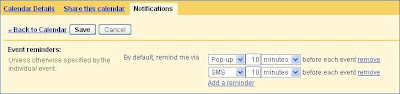
This is a fantastic feature and will remind you of calendar events even if you are away from your Desktop and do not have a PDA/Smartphone to sync your calendar.
For MS Outlook users, Google also provides a Calendar Sync feature (http://www.google.com/support/calendar/bin/answer.py?answer=98563) which will keep your Google and Outlook calendar in sync.
Thus, you can now get SMS before any personal or official event :)
After you login to Google Calendar (http://calendar.google.com/) click on the Settings->Mobile Setup Tab. Enter your mobile number and validate your number.
Once done, you can now ask Google Calendar to send Event Reminders through SMS (For free):

This is a fantastic feature and will remind you of calendar events even if you are away from your Desktop and do not have a PDA/Smartphone to sync your calendar.
For MS Outlook users, Google also provides a Calendar Sync feature (http://www.google.com/support/calendar/bin/answer.py?answer=98563) which will keep your Google and Outlook calendar in sync.
Thus, you can now get SMS before any personal or official event :)
Which Blackberry is the best?
There are a bunch off new Blackberries in the market these days. I'll take a look at each and give my views:
* Blackberry Bold (Powerful)
This is a power-packed Blackberry. It supports almost all the wireless protocols out there including WiFi and 3G. The screen resolution is equivalent to an iPhone even though the screen size is smaller and thus gives a very clear view. The processor and memory of this phone is better than any other blackberry (it will respond faster to your commands compared to other blackberries). The only negative aspect I can think of is the size. It's bigger than the 8900 or the pearl and will need a bigger pocket to go into.
* Blackberry Storm (Touch Screen)
After viewing the commercials, I was really exited about this phone. It was suppose to give serious competition to the iPhone as it is a blackberry with the touch screen. But sadly after going through few videos in YouTube it seems that the Storm lacks in power and has a slow response time. Moving through pictures/videos can be a pain. I would not like a smartphone which is slow.
* Blackberry Pearl Flip
When the original pearl was launched it was clearly a winner. The blackberry which is not FAT and fits in your hand comfortably. With the Flip, RIM has taken Pearl to the next level. So, if you want a sleek/small blackberry, then this is THE one for you. But you will have to compromise on the performance and screen quality if you settle for this one.
* Blackberry 8900 (Javelin)
This one comes really close to the Bold and will probably win if you consider the size. It's smaller than the Bold and has those curves which you will love. It has Wifi but no 3G. If you can compromise a bit on power and are not particular about having a 3G smartphone, then this is the one for you.
* Blackberry Bold (Powerful)
This is a power-packed Blackberry. It supports almost all the wireless protocols out there including WiFi and 3G. The screen resolution is equivalent to an iPhone even though the screen size is smaller and thus gives a very clear view. The processor and memory of this phone is better than any other blackberry (it will respond faster to your commands compared to other blackberries). The only negative aspect I can think of is the size. It's bigger than the 8900 or the pearl and will need a bigger pocket to go into.
* Blackberry Storm (Touch Screen)
After viewing the commercials, I was really exited about this phone. It was suppose to give serious competition to the iPhone as it is a blackberry with the touch screen. But sadly after going through few videos in YouTube it seems that the Storm lacks in power and has a slow response time. Moving through pictures/videos can be a pain. I would not like a smartphone which is slow.
* Blackberry Pearl Flip
When the original pearl was launched it was clearly a winner. The blackberry which is not FAT and fits in your hand comfortably. With the Flip, RIM has taken Pearl to the next level. So, if you want a sleek/small blackberry, then this is THE one for you. But you will have to compromise on the performance and screen quality if you settle for this one.
* Blackberry 8900 (Javelin)
This one comes really close to the Bold and will probably win if you consider the size. It's smaller than the Bold and has those curves which you will love. It has Wifi but no 3G. If you can compromise a bit on power and are not particular about having a 3G smartphone, then this is the one for you.
Tuesday, January 06, 2009
Sample C Server which handles zombie processes
After a bit of googling I managed to create a simple Server (written in C) which accepts connection on port 5000 and spawns a new thread to handle each request:
Here I simply write a string (Hello World!) to the client. You may perform multiple reads/writes.
The zombie_handler function ensures that no zombie processes are created once the child exists.
#include <stdio.h>
#include <sys/types.h>
#include <sys/socket.h>
#include <netinet/in.h>
#include <netdb.h>
#include <unistd.h>
#include <signal.h>

#define MAX_CLIENT    10

void zombie_handler(int iSignal)
{
        signal(SIGCHLD,zombie_handler); //reset handler to catch SIGCHLD for next time;
        int status;
        pid_t pid;

        pid = wait(&status); //After wait, child is definitely freed.
        printf("pid = %d , status = %d\n", pid, status);
}

int main(int argc, char *argv[])
{
        int tcp_sockfd, k, portno=0, tcp_newsockfd, n;
        struct sockaddr_in myServer, myClient;
        char bufferin[256],bufferout[256],ipaddress[20],hostname[50];
        char s[INET6_ADDRSTRLEN];
        struct hostent *host;
        pid_t pid=-1;

        signal(SIGCHLD,zombie_handler);

        //////////////////// Create a TCP Socket and get the port number dynamically

        tcp_sockfd = socket(AF_INET, SOCK_STREAM, 0);
        if (tcp_sockfd < 0)
                error("ERROR opening TCP socket");

        bzero((char *) &myServer, sizeof(myServer));
        myServer.sin_family = AF_INET;
        myServer.sin_addr.s_addr = htonl(INADDR_ANY);
        myServer.sin_port = htons(5000);
        if (bind(tcp_sockfd, (struct sockaddr *) &myServer, sizeof(myServer)) < 0)
                error("ERROR on binding");

        portno = ntohs(myServer.sin_port);

        if(gethostname(hostname,50) == -1)                                              // get hostname of the chat server machine
                error("ERROR on gethostname");
        host = gethostbyname(hostname);                                                 // get host information
        strcpy(ipaddress,(char *)inet_ntoa(*(long*)host->h_addr_list[0]));              //get IP Address string format

        printf("Chat Server IP Address : %s\n",ipaddress);
        printf("Chat Server Port Number : %d\n",portno);

//////////////////////////////////////// Now wait for connection from Client
        if(listen(tcp_sockfd,MAX_CLIENT) == -1)
                error("ERROR on listen");

        while(1)
        {
                printf("Waiting for connection...\n");
                k=sizeof(myClient);
                tcp_newsockfd = accept(tcp_sockfd,(struct sockaddr *)&myClient,&k);
                if (tcp_newsockfd == -1) {
                        printf("error in accept\n");
                        continue;
                }

                if (!fork()) { // this is the child process
                        close(tcp_sockfd); // child doesn't need the listener
                        if (send(tcp_newsockfd, "Hello, world!", 13, 0) == -1)
                                perror("send");
                        close(tcp_newsockfd);
                        exit(0);
                }
                close(tcp_newsockfd);  // parent doesn't need this


        }
        close(tcp_sockfd);

        return 0;
}
Here I simply write a string (Hello World!) to the client. You may perform multiple reads/writes.
The zombie_handler function ensures that no zombie processes are created once the child exists.
Friday, December 05, 2008
Getting Lightning to work with Ubuntu 8.10
The Lightning extension(0.9) of Thunderbird(2.0.0.18) does not work appropriately on Ubuntu 8.10 .
The primary reason is that Lightning works best with libstdc++5 whereas Ubuntu 8.10 comes with libstdc++6.
Following steps will help fix this:
1) sudo apt-get install libstdc++5
2) Un-install the Lightning Extension of Thunderbird
3) Re-install Lightning
Update: The first step fails with Ubuntu 9.10. Install libstdc++5 using the instructions here.
The primary reason is that Lightning works best with libstdc++5 whereas Ubuntu 8.10 comes with libstdc++6.
Following steps will help fix this:
1) sudo apt-get install libstdc++5
2) Un-install the Lightning Extension of Thunderbird
3) Re-install Lightning
Update: The first step fails with Ubuntu 9.10. Install libstdc++5 using the instructions here.
Tuesday, November 04, 2008
Resize ntfs partition to install Ubuntu 8.10
I recently tried to upgrade Ubuntu 8.04 to 8.10 on my PC but the installation failed due to insufficient disk space under the /boot partition. 8.10 needs about 120 MB free space but I had only 60 MB free under /boot.
To expand the /boot (second) partition, I had to shrink the first partition which was (unfortunately) ntfs. The gparted (disk partition tool for linux/ubuntu) installed on 8.04 wasn't of much help as it only supports deletion or formating of ntfs partitions.
I got a Ubuntu 8.10 installation CD and booted my PC using the same. The gparted utility on 8.10 supports resize of ntfs partitions :) . I successfully shrunk the ntfs partition and expanded the second (/boot) partition.
After restarting the system with the installed Ubuntu 8.04 version, the upgrade started successfully.
Note: Before attempting resize of any partition, do backup your critical data.
To expand the /boot (second) partition, I had to shrink the first partition which was (unfortunately) ntfs. The gparted (disk partition tool for linux/ubuntu) installed on 8.04 wasn't of much help as it only supports deletion or formating of ntfs partitions.
I got a Ubuntu 8.10 installation CD and booted my PC using the same. The gparted utility on 8.10 supports resize of ntfs partitions :) . I successfully shrunk the ntfs partition and expanded the second (/boot) partition.
After restarting the system with the installed Ubuntu 8.04 version, the upgrade started successfully.
Note: Before attempting resize of any partition, do backup your critical data.
"Fan Error" - ThinkPad
My laptop is about 2 years old and it was working perfectly fine till today morning. While booting (after the bios loaded) it displayed "Fan Error" and the system automatically shut down. I started the system a number of times but the same error kept occurring.
There was some weird sound coming from the Fan. I guess the Fan must've got stuck due to dust or something. I tapped (quite hard) the laptop from the side a couple of times and surprisingly it started working :)
If you get a similar problem then try this at your OWN risk coz the situation might worsen. Eventually, I guess the fan will have to be replaced but if at all you get it working for once, do take backup of critical data immediately (I did).
There was some weird sound coming from the Fan. I guess the Fan must've got stuck due to dust or something. I tapped (quite hard) the laptop from the side a couple of times and surprisingly it started working :)
If you get a similar problem then try this at your OWN risk coz the situation might worsen. Eventually, I guess the fan will have to be replaced but if at all you get it working for once, do take backup of critical data immediately (I did).
Sunday, November 02, 2008
Configuring app.yaml for static websites
In case you want to publish a static website on Google App Engine (http://appengine.google.com/) then the following configuration can be used (app.yaml):
This assumes the following:
1) The application name is appname (change it to your registered application name on appengine.google.com)
2) All static pages are under the static directory (appname/static)
This works fine, but any request to http://appname.appspot.com/ (or another domain in case you are using Google Apps) will not automatically be redirected to http://appname.appspot.com/index.htm (or index.html). In case you want such a behavior, create a python script (like main.py) under the application directory (appname/) with the following content:
and change the app.yaml to:
application: appname
version: 1
api_version: 1
runtime: python

handlers:
- url: /(.*)
  static_files: static/\1
  upload: static/(.*)
This assumes the following:
1) The application name is appname (change it to your registered application name on appengine.google.com)
2) All static pages are under the static directory (appname/static)
This works fine, but any request to http://appname.appspot.com/ (or another domain in case you are using Google Apps) will not automatically be redirected to http://appname.appspot.com/index.htm (or index.html). In case you want such a behavior, create a python script (like main.py) under the application directory (appname/) with the following content:
import cgi

from google.appengine.ext import webapp
from google.appengine.ext.webapp.util import run_wsgi_app

class MainPage(webapp.RequestHandler):
  def get(self):
    self.redirect('/index.htm')

application = webapp.WSGIApplication(
                                     [('/', MainPage)],
                                     debug=True)

def main():
  run_wsgi_app(application)

if __name__ == "__main__":
  main()
and change the app.yaml to:
application: appname
version: 1
api_version: 1
runtime: python

handlers:
- url: /
  script: main.py

- url: /(.*)
  static_files: static/\1
  upload: static/(.*)
Saturday, July 12, 2008
Pre-populate cache for faster performance
Recently I came across a scenario where load had to be shifted from an existing database server to a newer (faster) machine. This is usually not a problem but the challenge this time was to do this during peak-load.
I tried to shift queries to the new server a number of times, but found the load shooting up each time. Thus, the queries had to be shifted back to the old machine.
After a bit of investigation it was found that since the new server had not cached the database contents, it lead to high load and thus the server response time dropped drastically. To overcome this, I used a small trick. I cached the database contents (at least the indexes) before sending the queries back to the new server. To pre-populate the cache (RAM), use the following:
cat TABLE_FILES > /dev/null
(Considering that TABLE_FILES are the file names which contain the data/index)
This will make the OS read complete contents of the desired files and dump the output to /dev/null. Certainly this is useful only if your data/index size is less than RAM.
After this, the new machine worked like a breeze and there was no significant i/o.
I tried to shift queries to the new server a number of times, but found the load shooting up each time. Thus, the queries had to be shifted back to the old machine.
After a bit of investigation it was found that since the new server had not cached the database contents, it lead to high load and thus the server response time dropped drastically. To overcome this, I used a small trick. I cached the database contents (at least the indexes) before sending the queries back to the new server. To pre-populate the cache (RAM), use the following:
cat TABLE_FILES > /dev/null
(Considering that TABLE_FILES are the file names which contain the data/index)
This will make the OS read complete contents of the desired files and dump the output to /dev/null. Certainly this is useful only if your data/index size is less than RAM.
After this, the new machine worked like a breeze and there was no significant i/o.
Monday, May 26, 2008
More memory does not necessarily mean more speed
If the processor waits for i/o most of the time then adding more Primary Memory (RAM) usually helps. But before that decision is made, there are a few important things to look at:
1) What is the total data size that can be accessed?
2) How much data is accessed multiple times (at least more than once)? And how much Memory does this data require?
If the total data size is only a couple of gigs then you can probably think of having equivalent amount of Memory. But if the data size is tens or hundreds of gigabytes then adding that much Memory will certainly be very expensive.
Lets consider a case where the a database instance stores 200 GB of data. Out of this, only 4 GB is accessed multiple times in day and the rest might be accessed only once. In such a scenario, anything above 6 GB (the extra memory for kernel and other processes, if any) should be of no help because every time that extra data (other than the 4 GB) is accessed, the CPU has to wait for the disk i/o to complete.
1) What is the total data size that can be accessed?
2) How much data is accessed multiple times (at least more than once)? And how much Memory does this data require?
If the total data size is only a couple of gigs then you can probably think of having equivalent amount of Memory. But if the data size is tens or hundreds of gigabytes then adding that much Memory will certainly be very expensive.
Lets consider a case where the a database instance stores 200 GB of data. Out of this, only 4 GB is accessed multiple times in day and the rest might be accessed only once. In such a scenario, anything above 6 GB (the extra memory for kernel and other processes, if any) should be of no help because every time that extra data (other than the 4 GB) is accessed, the CPU has to wait for the disk i/o to complete.
Saturday, May 24, 2008
Parsing apache logs to identify IP with max requests
To find out the IP Addresses which generated the maximum number of requests, following Linux command can be used:
gawk {'print $1'} access_log | sort -n | uniq -d -c | sort -n
Note: This assumes that you're logging the IP Address in the first column
gawk {'print $1'} access_log | sort -n | uniq -d -c | sort -n
Note: This assumes that you're logging the IP Address in the first column
Saturday, April 12, 2008
Scaling Up Vs Scaling Out
You've got the website up and running, your clients love it, more and more people want to use it. Everything seems to be going great. One fine day you realize that your systems are getting chocked and clients have started complaining. You keep adding new machines to your environment (doing quick-fixes in the application to support this distributed architecture) and believe that this scaling-out approach is the right way to move forward (after all, the big guys like google n yahoo have thousands of machines). After a couple of years, there are 10s (or probably 100s) of machines serving your website traffic and the infrastructure, administration etc. costs have gone up considerably. And due to the quick-fixes, its really difficult to work on a new clean architecture and add more features to your application.
Lets consider what Googles got and how the scaling-out approach works great for them:
1) Possibly the best Engineers in the world
2) Google File System (GFS)
3) Map-Reduce
4) An infrastructure where you can treat a server class machine like a plug-n-play device
5) Applications which are designed keeping GFS and MapReduce in mind
... and god knows what else
If you've got anything close to this, then scaling-out is the obvious answer. Otherwise, read on...
There are 3 major components to consider while choosing a Server:
1) CPUs
2) Primary Memory (RAM)
3) RAID configuration (RAID 0, RAID 1, RAID 5 etc.)
A server has certain limitations in terms of the amount of Memory and number of CPUs it can hold. (mid-level, server class systems come with support of up to 32 GB memory and 4 CPUs). Adding more CPU or Memory becomes very expensive after this. So, there is linear cost of adding more memory and CPU to a certain extent and after that it becomes exponential.
Example: Lets say you've got a 100 GB database. It works comfortably with a 16 GB(expandable upto 32GB) RAM, 2-CPU Server. Once the database size goes up and the users increase, this single server might not be able to handle the load. The option is either to increase RAM (most database servers need more memory and not CPU power) or add another machine. The economical solution will probably be to add more RAM (addition of another 16 GB memory will cost significantly less than what a new server would). After a certain point addition of RAM might be more costly than adding a new server and thus the better option is to scale-out at this point.
The key is to scale-up till the cost is linear and side-by-side start work on the Application architecture such that you can run your application smoothly on multiple servers and scale-out thereafter.
Choosing the right RAID configuration is also important, it depends on what operation you perform the most (read, write or read+write). I'm not an expert in RAID configurations so do a bit of googling and you'll get a number of articles on this.
Lets consider what Googles got and how the scaling-out approach works great for them:
1) Possibly the best Engineers in the world
2) Google File System (GFS)
3) Map-Reduce
4) An infrastructure where you can treat a server class machine like a plug-n-play device
5) Applications which are designed keeping GFS and MapReduce in mind
... and god knows what else
If you've got anything close to this, then scaling-out is the obvious answer. Otherwise, read on...
There are 3 major components to consider while choosing a Server:
1) CPUs
2) Primary Memory (RAM)
3) RAID configuration (RAID 0, RAID 1, RAID 5 etc.)
A server has certain limitations in terms of the amount of Memory and number of CPUs it can hold. (mid-level, server class systems come with support of up to 32 GB memory and 4 CPUs). Adding more CPU or Memory becomes very expensive after this. So, there is linear cost of adding more memory and CPU to a certain extent and after that it becomes exponential.
Example: Lets say you've got a 100 GB database. It works comfortably with a 16 GB(expandable upto 32GB) RAM, 2-CPU Server. Once the database size goes up and the users increase, this single server might not be able to handle the load. The option is either to increase RAM (most database servers need more memory and not CPU power) or add another machine. The economical solution will probably be to add more RAM (addition of another 16 GB memory will cost significantly less than what a new server would). After a certain point addition of RAM might be more costly than adding a new server and thus the better option is to scale-out at this point.
The key is to scale-up till the cost is linear and side-by-side start work on the Application architecture such that you can run your application smoothly on multiple servers and scale-out thereafter.
Choosing the right RAID configuration is also important, it depends on what operation you perform the most (read, write or read+write). I'm not an expert in RAID configurations so do a bit of googling and you'll get a number of articles on this.
Friday, February 29, 2008
Profiling PHP code with xdebug
Using xdebug to profile php code is very simple.
Following are the steps to get started:
1) Install the xdebug extension (http://xdebug.org/docs/install) for PHP.
2) Enable profiling for any PHP which gets executed by setting xdebug.profiler_enable=1 in php.ini
3) Restart the Apache Server
From now on, whenever you execute a PHP, files with name starting from cachegrind.out will be created under the /tmp directory.
4) Install kcachegrind (http://kcachegrind.sourceforge.net/)
5) start kcachegrind with the cachegrind.out file as the parameter (eg. kcachegrind cachegrind.out.12345)
6) Set xdebug.profiler_enable=0 in php.ini to disable profiling.
Following are the steps to get started:
1) Install the xdebug extension (http://xdebug.org/docs/install) for PHP.
2) Enable profiling for any PHP which gets executed by setting xdebug.profiler_enable=1 in php.ini
3) Restart the Apache Server
From now on, whenever you execute a PHP, files with name starting from cachegrind.out will be created under the /tmp directory.
4) Install kcachegrind (http://kcachegrind.sourceforge.net/)
5) start kcachegrind with the cachegrind.out file as the parameter (eg. kcachegrind cachegrind.out.12345)
6) Set xdebug.profiler_enable=0 in php.ini to disable profiling.
Wednesday, February 20, 2008
Average file size within a directory
To calculate the average file size within a directory on a Linux system, following command can be used:
ls -l | gawk '{sum += $5; n++;} END {print sum/n;}'
If you'd like to know the average size of some particular kind of files (like jpg files) then use the following:
ls -l *.jpg | gawk '{sum += $5; n++;} END {print sum/n;}'
ls -l | gawk '{sum += $5; n++;} END {print sum/n;}'
If you'd like to know the average size of some particular kind of files (like jpg files) then use the following:
ls -l *.jpg | gawk '{sum += $5; n++;} END {print sum/n;}'
Monday, February 11, 2008
Gmail Spam Filter
I've been using Yahoo Mail, Hotmail and Gmail for few years now. Out of these, Gmail certainly has the most effective spam filter and keeps junk out of your Inbox.
The sad part is that at times it even marks some of the important mails as spam and thus you have to keep checking the spam filter regularly.
Few points to keep in mind if you use gmail:
* One way to reduce the chances of important mails being marked as spam is to add to your contact list the addresses from where you expect to receive mails.
* When you send out a mail to some address, then Gmail automatically adds that id to your contact list and thus Gmail should never mark any mail from that id as spam.
* If you download mails using POP, the Spam mails will never get downloaded (which is great in a way). Thus, you will always have to login using the web interface to check mails marked as Spam.
The sad part is that at times it even marks some of the important mails as spam and thus you have to keep checking the spam filter regularly.
Few points to keep in mind if you use gmail:
* One way to reduce the chances of important mails being marked as spam is to add to your contact list the addresses from where you expect to receive mails.
* When you send out a mail to some address, then Gmail automatically adds that id to your contact list and thus Gmail should never mark any mail from that id as spam.
* If you download mails using POP, the Spam mails will never get downloaded (which is great in a way). Thus, you will always have to login using the web interface to check mails marked as Spam.
Wednesday, February 06, 2008
Apache ReWrite Module
Apache has a very powerful tool (mod_rewrite) which can be used to redirect/rewrite requested URLs on the fly.
To use this module, you can configure apache with the '--enable-rewrite' option before compilation. Then, set 'RewriteEngine on' in the httpd.conf to start using it.
For complete details, please go to http://httpd.apache.org/docs/1.3/mod/mod_rewrite.html.
I will give a brief example which redirects all requests on http://www.localhost.com/ to http://localhost.com/ (I needed to do something like this for a site) and any request starting with '/redir/xyz' will execute '/test.php/redir/xyz'.
Following is copied from the httpd.conf.
...
...
NameVirtualHost 127.0.0.1:80
<VirtualHost 127.0.0.1:80>
ServerAdmin your@email.com
DocumentRoot /usr/local/apache/htdocs
ServerName localhost.com
ServerAlias localhost.com
RewriteEngine on
RewriteRule ^/redir/(.*) /test.php/redir/$1 [QSA,PT,L]
RewriteLog logs/rewrite_log
RewriteLogLevel 3
ErrorLog logs/local_error_log
CustomLog logs/local_access_log common
</VirtualHost>
<VirtualHost 127.0.0.1:80>
ServerAdmin your@email.com
DocumentRoot /usr/local/apache/htdocs
ServerName www.localhost.com
ServerAlias www.localhost.com
RewriteEngine on
RewriteRule ^/(.*) http://localhost.com/$1 [QSA,R,L]
RewriteLog logs/rewrite1_log
RewriteLogLevel 3
ErrorLog logs/local1_error_log
CustomLog logs/local1_access_log common
</VirtualHost>
To use this module, you can configure apache with the '--enable-rewrite' option before compilation. Then, set 'RewriteEngine on' in the httpd.conf to start using it.
For complete details, please go to http://httpd.apache.org/docs/1.3/mod/mod_rewrite.html.
I will give a brief example which redirects all requests on http://www.localhost.com/ to http://localhost.com/ (I needed to do something like this for a site) and any request starting with '/redir/xyz' will execute '/test.php/redir/xyz'.
Following is copied from the httpd.conf.
...
...
NameVirtualHost 127.0.0.1:80
<VirtualHost 127.0.0.1:80>
ServerAdmin your@email.com
DocumentRoot /usr/local/apache/htdocs
ServerName localhost.com
ServerAlias localhost.com
RewriteEngine on
RewriteRule ^/redir/(.*) /test.php/redir/$1 [QSA,PT,L]
RewriteLog logs/rewrite_log
RewriteLogLevel 3
ErrorLog logs/local_error_log
CustomLog logs/local_access_log common
</VirtualHost>
<VirtualHost 127.0.0.1:80>
ServerAdmin your@email.com
DocumentRoot /usr/local/apache/htdocs
ServerName www.localhost.com
ServerAlias www.localhost.com
RewriteEngine on
RewriteRule ^/(.*) http://localhost.com/$1 [QSA,R,L]
RewriteLog logs/rewrite1_log
RewriteLogLevel 3
ErrorLog logs/local1_error_log
CustomLog logs/local1_access_log common
</VirtualHost>
Friday, February 01, 2008
Compiling PHP with PDO-mysql
To install pdo-mysql with PHP, following are the steps:
1) configure PHP with '--enable-pdo=shared --with-pdo-mysql=shared' options.
2) compile and install PHP (make, make install)
3) Add 'extension = pdo.so' and 'extension = pdo_mysql.so' in the php.ini after pointing the extension_dir variable to the appropriate location where these 'so' reside. (eg. extension_dir = /usr/local/php/lib/php/extensions/no-debug-non-zts-20060613)
1) configure PHP with '--enable-pdo=shared --with-pdo-mysql=shared' options.
2) compile and install PHP (make, make install)
3) Add 'extension = pdo.so' and 'extension = pdo_mysql.so' in the php.ini after pointing the extension_dir variable to the appropriate location where these 'so' reside. (eg. extension_dir = /usr/local/php/lib/php/extensions/no-debug-non-zts-20060613)
Friday, January 25, 2008
Buying the WRT54G Wireless Router in India
To make my home wi-fi enabled, I decided to buy a Wireless Router. Loads of such routers are available these days and after doing a bit of research online I decided to go for the Linksys WRT54G router.
WRT54G routers allow you to install certain open-source (linux) firmware. If you are the kind who likes to play around with hardware, then this is the one for you. It allows you to do all sorts of things like increase the range (using the Xmit power), port-forwarding etc. etc. For details please goto http://www.dd-wrt.com/.
A friend of mine suggested to go for WRT54G Version-5 or 6 since he already had one and it was working fine with Linux firmware. So... I went to Nehru Place (supposedly THE place to buy computer hardware in New Delhi) and asked for Linksys WRT54G router. Surprisingly the version information wasn't mentioned on the router's box.. I tried a few more shops.... but again, no version information. Hoping that the router will work with linux firmware I decided to purchase the router for Rs. 2150/-. Once I got home and opened the box 'version 7' was mentioned at the back of the router. After a bit of googling it was clear that this version of WRT54G CANNOT be upgraded to Linux firmware. Even if I try to install the firmware, the router will get 'bricked' (basically of no use and will have to be thrown).
If you are planning to buy the WRT54G router and install Linux firmware on it, please ensure that it's NOT 'version 7'. All versions (v5,6,8) can be upgraded to Linux firmware but not v7. The serial number of all WRT54G v7 routers starts with 'CDFE'. The serial number is mentioned on the router's box (wish I knew this early on).
Luckily I found someone who already had a 2 year old v5 WRT54G and was happy to exchange his router with my new v7 router :)
I have now successfully upgraded the v5 router to Linux firmware(dd-wrt) and its working fine.
WRT54G routers allow you to install certain open-source (linux) firmware. If you are the kind who likes to play around with hardware, then this is the one for you. It allows you to do all sorts of things like increase the range (using the Xmit power), port-forwarding etc. etc. For details please goto http://www.dd-wrt.com/.
A friend of mine suggested to go for WRT54G Version-5 or 6 since he already had one and it was working fine with Linux firmware. So... I went to Nehru Place (supposedly THE place to buy computer hardware in New Delhi) and asked for Linksys WRT54G router. Surprisingly the version information wasn't mentioned on the router's box.. I tried a few more shops.... but again, no version information. Hoping that the router will work with linux firmware I decided to purchase the router for Rs. 2150/-. Once I got home and opened the box 'version 7' was mentioned at the back of the router. After a bit of googling it was clear that this version of WRT54G CANNOT be upgraded to Linux firmware. Even if I try to install the firmware, the router will get 'bricked' (basically of no use and will have to be thrown).
If you are planning to buy the WRT54G router and install Linux firmware on it, please ensure that it's NOT 'version 7'. All versions (v5,6,8) can be upgraded to Linux firmware but not v7. The serial number of all WRT54G v7 routers starts with 'CDFE'. The serial number is mentioned on the router's box (wish I knew this early on).
Luckily I found someone who already had a 2 year old v5 WRT54G and was happy to exchange his router with my new v7 router :)
I have now successfully upgraded the v5 router to Linux firmware(dd-wrt) and its working fine.
Subscribe to:
Posts (Atom)